
What vanity sizing is, and what a store can do about it
Vanity sizing is labeling clothes with a smaller size than their measurements would earn, so the number flatters. A store can't fix labels across an industry, but it can publish the measurements behind its own.
Vanity sizing is the practice of putting a smaller size on a garment than its measurements would get by an older or stricter scale. The dress is the same; the number on the label is lower. The name gives the usual explanation: a smaller number is nicer to read in a fitting room.
For a shopper, the result is that a size number stops describing a body. For a store, the answer isn't to pick a "correct" number. It is to publish measurements, so the label becomes a name and the numbers do the work.
The idea in one example
Picture two dresses cut for exactly the same body: a 92 cm bust, a 74 cm waist, 100 cm hips. One brand labels it a 10, another an 8. Nothing about the fabric changed. The second label is "vanity sized" compared with the first.
Now picture a shopper who owns the first dress and orders an 8 from a third brand, which cuts its 8 for a smaller body than either. The label matched, the dress doesn't. That is the whole problem, and you don't need a history of sizing or a survey to see it. Two garments with the same size and a tape measure show it.
A label is a name
Size labels were never a measurement to begin with. Look at the women's tops template in Ruban Size: one row of body measurements carries three different size numbers.
| Size | US | UK | EU | Chest (cm) | Waist (cm) | Hips (cm) |
|---|---|---|---|---|---|---|
| XS | 0-2 | 4-6 | 32-34 | 80-84 | 62-66 | 88-92 |
| S | 4-6 | 8-10 | 36-38 | 85-89 | 67-71 | 93-97 |
| M | 8-10 | 12-14 | 40-42 | 90-95 | 72-77 | 98-103 |
| L | 12-14 | 16-18 | 44-46 | 96-102 | 78-84 | 104-110 |
| XL | 16-18 | 20-22 | 48-50 | 103-110 | 85-92 | 111-118 |
The same body is an M, a US 8 to 10, a UK 12 to 14 and an EU 40 to 42. Every one of those labels is "right". Vanity sizing adds one more layer: two brands can print the same US 8 on different measurements, and both are still "right" by their own chart. Nothing makes a brand's M match anyone else's.
So the useful question for a store isn't "is my 8 a real 8?" It is "can a shopper tell what my 8 measures?"
What it costs a store
A shopper who trusts labels orders their usual number. If your number is cut for a different body than their last purchase, it doesn't fit, and you pay for the return or the exchange. A shopper who has been caught before does something else: orders two sizes and sends one back. The label didn't help either of them.
A measurement fixes both cases. "Chest 90 to 95 cm" means the same thing in every store and every country.
What a store can do: publish measurements, not labels
- Give a range for every size. Chest, waist and hips for tops and dresses; waist, hips and inseam for pants. Ranges like 90-95 are clearer than one number.
- Show centimeters and inches. Shoppers measure in the unit they grew up with.
- Say what the numbers measure. A body measurement and a garment laid flat are different numbers for the same size; body vs garment measurements explains the gap.
- Keep the labels, below the numbers. US, UK and EU rows help a shopper map what they know, as long as the measurements come first.
- Say how the item fits. When a cut runs small or large, a fit scale and a one-line note tell shoppers before they order (see what "true to size" means).
- Use your own numbers. Measure your garments or take your pattern's body measurements. Copying another brand's chart copies their M, not yours.
How Ruban Size handles it
The size chart editor is built for measurements. Paste your table from Excel, Numbers or Google Sheets; ranges like 35-36, fractions like 38 1/8 and decimals with commas are read as numbers. Shoppers get a cm and in switch, and their choice is remembered.
Size systems sit on their own rows (US, UK, EU), with a switch for shoppers. The default follows the shopper's country: US sizes in the US, UK sizes in Great Britain and Ireland, EU sizes elsewhere. The label is there, but it is clearly one way of naming the measurements above it.
Every template starts with typical values and says so in the chart: "Typical values: adjust them to your brand's own measurements before publishing." The women's tops template is the table above, ready for your own ranges.
Then Find my size takes labels out of the decision. Shoppers type their measurements, and the answer compares numbers, never names:
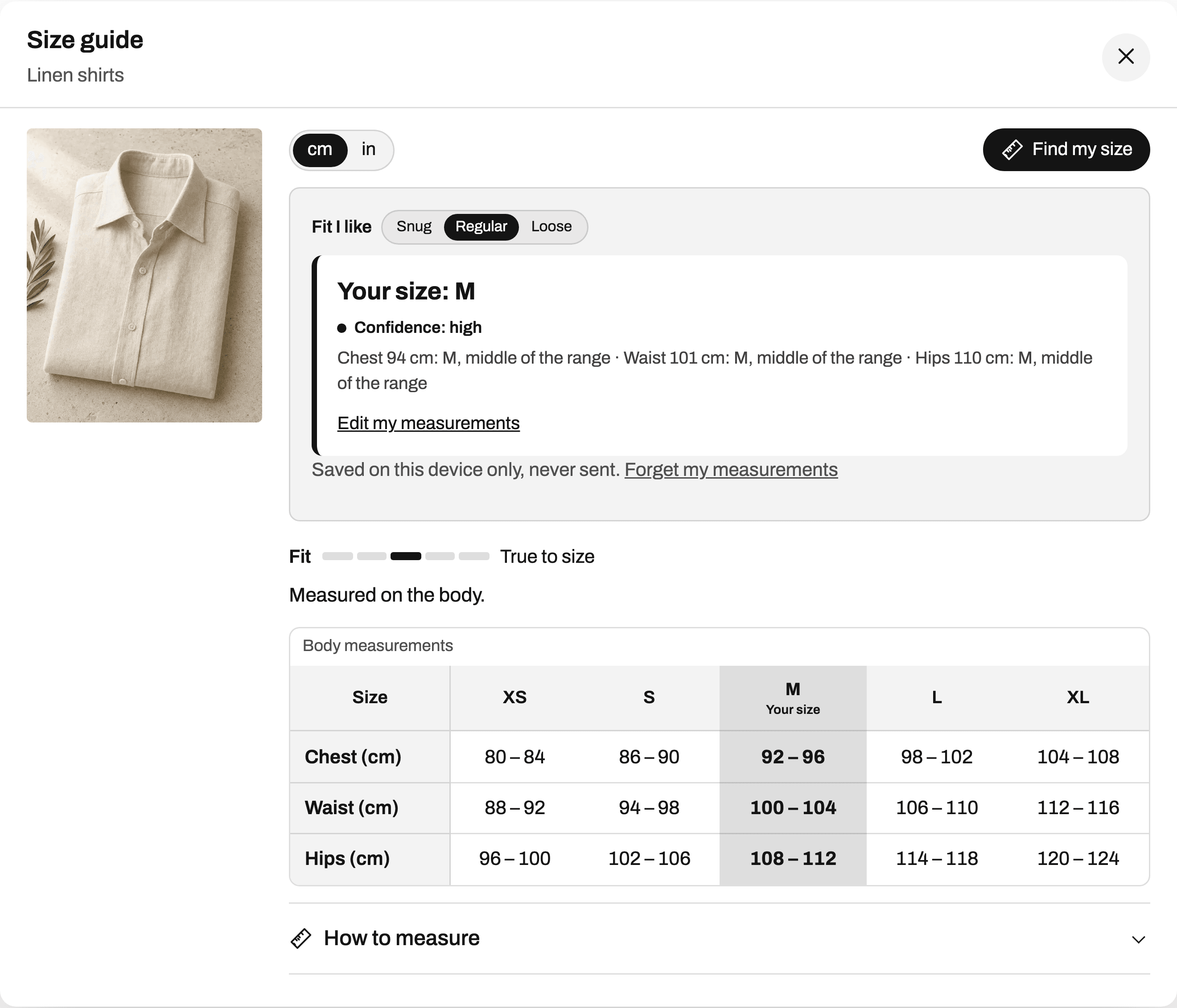
Each line says where a measurement lands: "Chest 92 cm: M, middle of the range". The measurements stay on the shopper's device, so "Your size" shows on every product, worked out from that product's own chart. A shopper who is an M in your tops and an L in your leggings sees both, without having to know that your leggings are cut closer.
Questions
Is vanity sizing real?
The mismatch is easy to check: take two garments with the same size label from two brands and measure them. How much labels have moved over time is argued about, but for a store the answer is the same either way: publish what your sizes measure.
Does vanity sizing affect men's clothes?
Many men's sizes are named after a measurement, a 32 waist or a 15½ collar, which leaves less room for it. Even then, check the chart: in Ruban Size's men's pants template, a size 32 is a 32 to 33 in waist, and the cut decides the rest.
How do I stop shoppers choosing by label alone?
Put the measurements first and the size systems below them, add a how to measure section, and offer a size finder that works from measurements. A shopper who types a chest of 94 cm never has to guess what your 8 means.
Should I relabel my sizes to match a bigger brand?
No. Relabeling moves the problem without solving it, because the next brand will be different again. Keep your labels and publish the measurements behind each one.
Keep reading
- Sizing explainedWhy a medium isn't the same size at every brandA medium is a name, not a measurement. Each brand decides which body its M fits, how much room it leaves and how sizes step up, so the fix is to publish the measurements behind your M and a one-line fit note.5 min
- Sizing explainedWhat "true to size" means, and how to show itTrue to size means an item fits the way its size chart says, so shoppers take the size the chart gives them. A store shows it best on a fixed scale from runs small to runs large, with one line of fit note.6 min
- Size conversionWomen's clothing sizes: US, UK and EU comparedA women's M is US 8 to 10, UK 12 to 14 and EU 40 to 42, for a bust of 90 to 95 cm (35.4 to 37.4 in). In these charts, UK numbers run 4 above US ones and EU numbers 32 above.6 min
- Sizing explainedBody measurements vs garment measurementsA body measurement is the person; a garment measurement is the product, often laid flat and halved. The gap between the two is ease, and comparing one with the other is the quickest way to a wrong size.6 min