
How to translate size charts on Shopify
Translate the words of a chart (its title, headers, measuring steps and notes) and leave sizes, numbers and size systems as they are. With Ruban Size, the guide's buttons already speak 22 languages and charts are translated in the app, field by field, with no Translate & Adapt needed.
A translated size chart has two parts. The guide's own words (the "Size guide" link, the unit switch, the buttons, the messages) should follow the language of the page the shopper is on. Your chart's words (the title, the headers, the measuring steps, the fit notes) you translate once per language. Sizes, numbers and size systems stay exactly as they are, so the chart keeps matching the size option on the page.
Step 1: publish your languages in Shopify
Translation starts in Shopify, not in the size chart. In Settings > Languages, add each language you sell in and publish it. Shoppers then reach each language at its own address, such as /fr/ or /ja/, and with Shopify Markets you choose which languages each market gets.
A size chart should follow that choice by itself. If a shopper reads your product page in German, the size guide that opens from it should be in German too, without a separate setting in the app.
What to translate, and what never to
| Part of the chart | Translate it? | Why |
|---|---|---|
| Title and link text | Yes | The first words shoppers see |
| Measurement names (Chest, Waist, Inseam) | Yes | Shoppers measure by these words |
| How to measure steps | Yes | The part read word by word, tape in hand |
| Fit notes ("Runs small") | Yes | They change which size people pick |
| Image descriptions | Yes | Screen readers read them aloud |
| Size labels (S, M, 38, 10) | No | They must match the size option on the page |
| Numbers and ranges (88-92) | No | The unit switch converts them |
| Size systems (US, UK, EU) | No | They name a scale, not a word |
Use the words your market uses, not a dictionary's. British shoppers know the inseam as the inside leg. A literal translation of a measuring step can tell people to measure the wrong place, so have a native speaker read the how to measure steps at least once.
Localize the sizes, don't translate them
Two things change from one country to the next without any translation: the size system and the unit.
- Size systems. Put US, UK and EU sizes on rows of their own and let shoppers switch. In Ruban Size the default follows the shopper's country: US sizes in the United States, UK sizes for Great Britain and Ireland, EU sizes elsewhere. How the scales line up is in women's clothing sizes: US, UK and EU compared.
- Units. Inches come first for shoppers in the US, Liberia and Myanmar, centimeters everywhere else, and a shopper's own choice is remembered. Values convert row by row, with fractions (½, ¼, ¾) or decimals for inches. The arithmetic is in centimeters to inches for size charts.
How Ruban Size handles languages
Ruban Size splits the work into three layers, each in the right language for the person reading it.
- The guide's own words follow the shopper. "Size guide", "Find my size", "Fit I like", the unit switch and every message come translated in 22 languages, and follow the language of the store page the shopper visits. Arabic reads right to left, and the guide turns over with the theme. There's nothing to set.
- Your charts are translated in the app. From Size charts, open Translate and pick one of your store's languages. Every text of your charts is listed with its original beside it: titles, link text, table headers, text cells, how to measure steps, the fit label and note, image descriptions and captions, shared sections. Sizes, numbers and size systems aren't in the list. Leave a field empty to show the original text.
- The app itself speaks 21 languages, following the language of your Shopify admin.
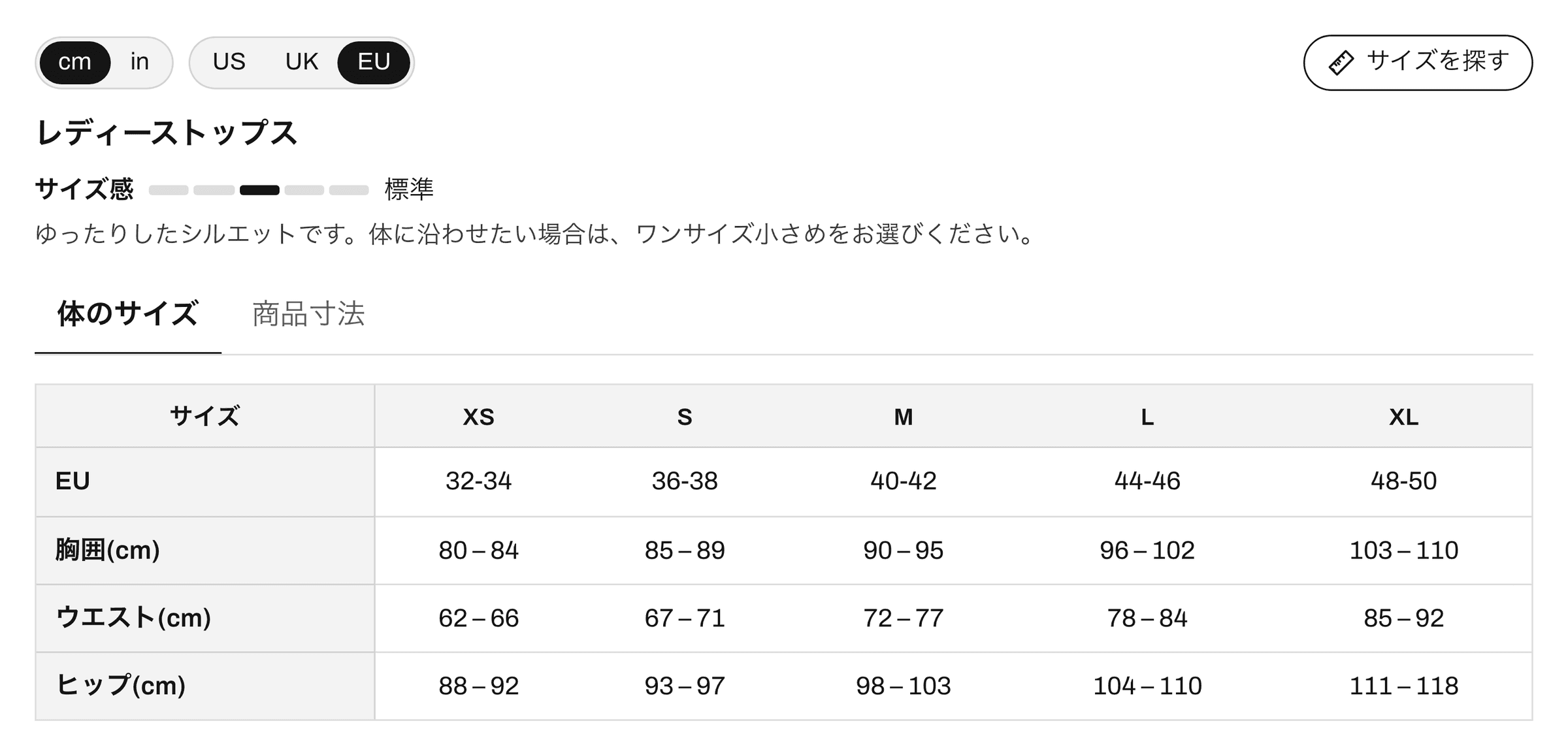
The translations are saved in your store, as Shopify translations of each chart's fields, and the theme shows the right one on /ja/, /de/ or /fr/. When a chart changes after it was translated, the Translate page says so, so an edited header doesn't stay in English in one language.
Templates come translated. A template is created in your store's main language, and every other language you publish is saved with it on the first save: 208 texts per language, for each of the 22. A new chart from a template is ready for every market from the start. Browse them on the templates page.
Check before you publish. The full-screen preview runs the real size guide on a product page in any of your languages, on a phone, a tablet or a computer, with the chart in its saved translation.
The guide speaks English, French, German, Spanish, Italian, Dutch, Portuguese (Brazil and Portugal), Polish, Swedish, Danish, Norwegian, Finnish, Czech, Turkish, Japanese, Chinese (simplified and traditional), Korean, Thai, Vietnamese and Arabic. The translations page shows it in each.
Do you need Translate & Adapt?
Not for the size charts. Translate & Adapt is Shopify's own translation app, and it stays useful for your products, pages and theme. Ruban Size charts are translated inside Ruban Size, and the guide's interface comes already translated, so there's no second place to keep in sync.
The same goes for Find my size: its questions, fit choices and answers ("Your size: M", "Confidence: high") are part of the guide's own words, in every one of the 22 languages. The Find my size page shows how it answers.
A check for each new language
- Open a product with a chart at the language's address, for example /fr/.
- Open the size guide: the link, the buttons and the unit switch should be in French.
- Read the title, the headers and the how to measure steps. Anything still in English is a field left empty.
- Check that the sizes in the table are the same as in the size option above it.
- Switch units, and try Find my size with your own measurements.
- Do it once on a phone. Some languages run longer than English, and the headers should still fit.
Questions
Do I need Translate & Adapt to translate size charts?
Not with Ruban Size. Charts are translated in the app, field by field, and the guide's own texts come translated in 22 languages. Translate & Adapt stays useful for the rest of your store.
Should sizes be translated in a size chart?
No. Sizes, numbers and size systems stay as they are, so the chart keeps matching the size option of the product. Translate the words around them: the title, the measurement names, the steps and the notes.
Which languages does the Ruban Size guide speak?
22: English, French, German, Spanish, Italian, Dutch, Portuguese (Brazil and Portugal), Polish, Swedish, Danish, Norwegian, Finnish, Czech, Turkish, Japanese, Chinese (simplified and traditional), Korean, Thai, Vietnamese and Arabic, right to left.
Can US shoppers see inches and everyone else centimeters?
Yes. Ruban Size shows inches first to shoppers in the US, Liberia and Myanmar and centimeters elsewhere, with a one-tap switch, and remembers each shopper's choice.
Keep reading
- Size conversionWomen's clothing sizes: US, UK and EU comparedA women's M is US 8 to 10, UK 12 to 14 and EU 40 to 42, for a bust of 90 to 95 cm (35.4 to 37.4 in). In these charts, UK numbers run 4 above US ones and EU numbers 32 above.6 min
- Size conversionCentimeters to inches for size charts, fractions includedAn inch is exactly 2.54 cm, so divide centimeters by 2.54. Round body measurements to the quarter inch, small ones like hands and feet to the eighth, and heights to the whole inch in feet and inches.5 min
- Shopify guidesSize charts and Shopify metafields: how they fit togetherMetafields add your own fields to products, and metaobjects let you define a kind of content, like a size chart, once and reuse it. You can build a chart from them yourself. Ruban Size uses the same pieces, so your charts live in your store and show without its servers.5 min
- Shopify guidesHow to add a size chart to ShopifyShopify has no size chart tool of its own, so you add one with an image, a page, metafields or an app. An app gives you real tables, the right chart on each product and a cm/in switch; the other ways mostly get you an image.6 min