
A free size chart for Shopify: what you can do at $0
At $0 you can paste a chart into a product description or a page, build one from metafields, or use a free app plan. Ruban Size's Free plan holds 5 active size charts with every rule, the 39 templates and Find my size, in a popup with a small credit line.
You can show a size chart on Shopify without paying anything, in two ways. Without an app, put the chart in the product description, on a page, or in a metafield shown by your theme. With an app, use a free plan: the size chart apps compared below all have one, and they differ in how many charts they allow and what they leave out.
Ruban Size's Free plan has 5 active charts, every product rule, the 39 templates and Find my size, the size finder. The guide opens as a popup, with a small "Size chart by Ruban Size" line.
Free, without an app
Three ways, all built into Shopify:
- An image or a table in the product description. Free and works on any theme. On a phone the image shrinks with the screen, there is no unit switch, and each change means editing every product that uses it.
- A size guide page. One page under Online Store > Pages, linked from the product or the menu. Easy to update, but shoppers leave the product to read it, and the page can't know which chart a product needs.
- Metafields. A chart stored per product, or one chart as a metaobject that many products point to, shown with a block in the theme editor. The cleanest of the three, and the most work: size charts and Shopify metafields walks through it.
They work for a few products in one unit. How to add a size chart to Shopify compares them with an app, side by side.
Free plans of size chart apps
As listed on their pricing pages in November 2026:
| App | Free plan | First paid plan |
|---|---|---|
| Ruban Size | 5 active charts, every rule, Find my size, a small "Size chart by Ruban Size" line | Pro, $4.99 a month: unlimited charts |
| Kiwi Size Chart & Recommender | 3 charts, Kiwi watermark | Premium, $7.99 (10 charts) |
| MP Size Chart & Size Guide | 3 charts | $6.95 (10 charts) |
| BF Size Chart & Size Guide | 3 charts, no watermark | $2.99 (10 charts) |
| ESC Size Charts | 3 charts, watermark | $4.99, unlimited |
| Smart Size Chart & Size Guide | 2 charts | $9 (10 charts) |
| CSC Size Chart & Size Guide | 2 charts | $6.99, unlimited |
| Jotly Size Chart & Size Guide | 2 charts | $6.99, unlimited |
Size recommenders are where the free plans part ways. As listed, Kiwi's starts on its Plus plan at $14.99 plus a usage fee by orders, Smart Size's from $19 (100 shoppers a month) and CSC's from $14.99 (500 recommendations); MP lists an AI recommender with a quota; BF, ESC and Jotly list none. Ruban Size's Find my size is on every plan, the free one included. The best Shopify size chart apps compares the paid plans too.
What 5 charts cover
Five charts go further than five products, because a chart is per cut, not per product:
- One chart, many products. Every dress cut from the same pattern shares one chart. A rule on a tag or a product type attaches it to all of them, and to the next one you add.
- Several tables in one chart. A chart can hold tabs (body measurements in one, garment measurements in the other) and still count once.
- Drafts don't count. Only active charts count toward the 5, so you can prepare the next one before you need it.
A store selling tops, dresses, jeans, swimwear and kids' clothes fits in five charts. Rings, shoes and bras each want their own, since they are sized differently.
What the Free plan includes
- 5 active size charts, with tables you paste from a spreadsheet, units that switch between cm and inches, size systems, how to measure guides, text, images and video.
- Every rule: all products, tags, vendors, types, collections, chosen products, title and handle conditions, SKUs, countries, exclusions and priority. See the product rules.
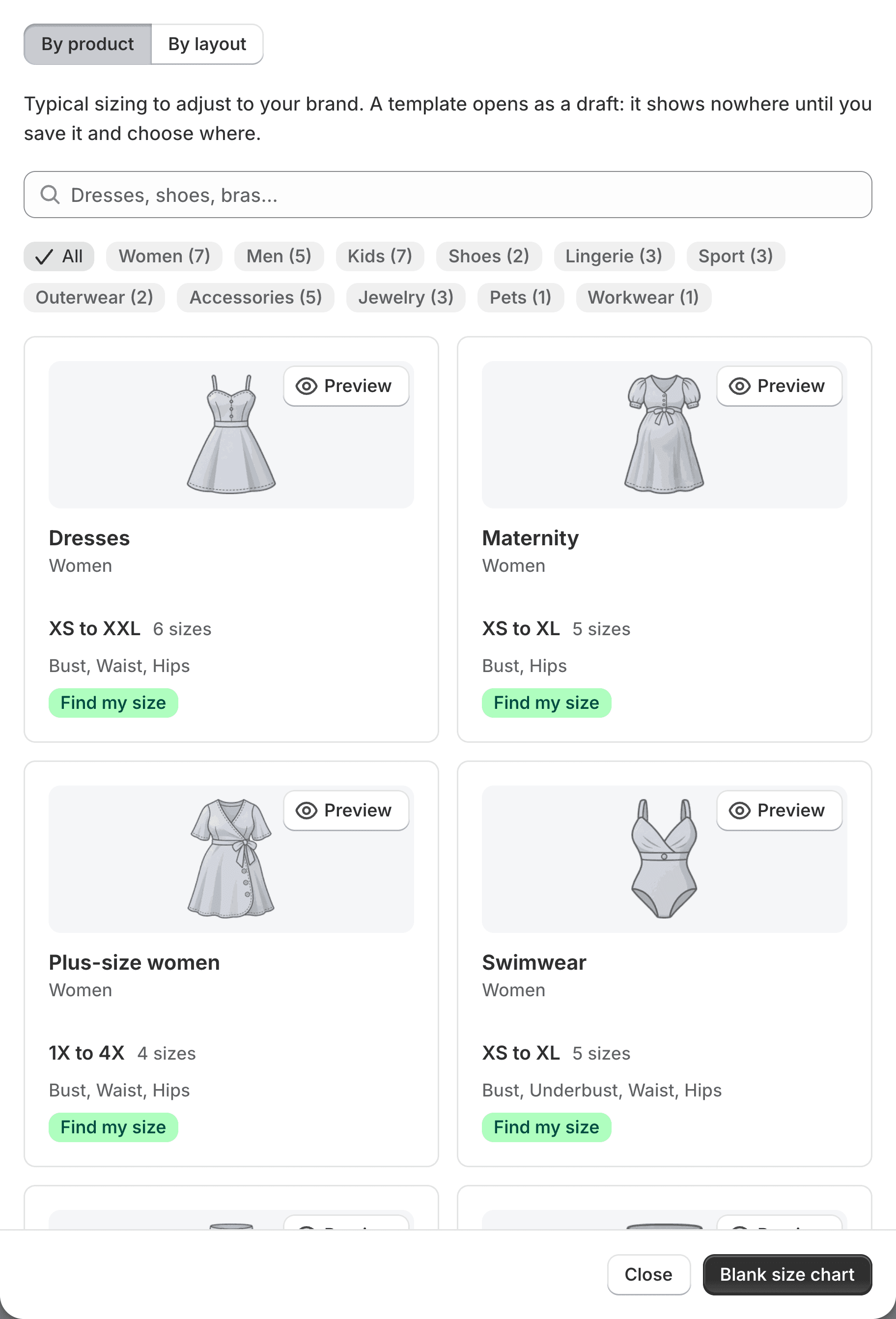
- The 39 templates, in 11 categories, from dresses to dog coats. They open as drafts and show nowhere until you save and assign them.
- Find my size on every chart with measurements: one size from the shopper's measurements, how sure it is, and why.
- Imports from a CSV or JSON file or a pasted table, and a full JSON backup at any time.
- The popup layout, which slides up from the bottom on phones.
Features that aren't tied to a plan, such as chart translations, shared sections, version history, the coverage report and the size guide page, work on Free too.
What it leaves out
On Pro ($4.99 a month or $49 a year): unlimited charts, the credit line made optional, the side drawer, inline, accordion, floating button and quick view layouts, imports from Kiwi, MP, BF and ESC, the AI import, the CSV export and basic statistics. On Fit ($9.99 a month or $99 a year): Pro plus returns by size, the estimate from height, weight and age, and detailed statistics. Both start with a 14-day free trial, are billed by Shopify, and charge no fees on orders. The pricing page has the full list.
Moving from another app's free plan? Imports from other apps are on Pro and Fit, but a CSV or a pasted table works on Free, and the import page explains both.
If you upgrade, then come back to Free
Nothing is deleted. Your charts stay; the storefront shows 5 of them: the ones you keep active, or else the first 5 by priority, then the most recently updated. The admin says so and lets you choose which 5; the others become drafts, ready for when you need them.
Questions
Is there a free size chart app for Shopify?
Yes. Several size chart apps have free plans of 2 or 3 charts. Ruban Size's Free plan has 5 active charts, every rule, the templates and Find my size, with a small "Size chart by Ruban Size" line.
Can I add a size chart to Shopify without an app?
Yes: an image or table in the product description, a size guide page, or a metafield shown by a theme block. They suit a few products in one unit; an app adds the right chart per product and a unit switch.
How many size charts do I need?
One per cut, not one per product. Products made from the same pattern share a chart, so a store needs about one chart for each kind of garment it sells.
Does the free plan include a size recommender?
On Ruban Size, yes: Find my size is on every plan. Among the other apps compared here, recommenders are listed on paid plans, with a quota, or not at all, as shown on their pricing pages.
Keep reading
- Shopify guidesHow to add a size chart to ShopifyShopify has no size chart tool of its own, so you add one with an image, a page, metafields or an app. An app gives you real tables, the right chart on each product and a cm/in switch; the other ways mostly get you an image.6 min
- Size chart appsThe best Shopify size chart apps in 2026, comparedThe right size chart app comes down to three numbers: how many charts you need, how many orders you take, and whether you want a size recommender. Unlimited charts are listed from $4.99 a month; recommenders and usage fees are where the plans differ most.5 min
- Shopify guidesSize charts and Shopify metafields: how they fit togetherMetafields add your own fields to products, and metaobjects let you define a kind of content, like a size chart, once and reuse it. You can build a chart from them yourself. Ruban Size uses the same pieces, so your charts live in your store and show without its servers.5 min
- Shopify guidesHow to show a different size chart on each Shopify productLet the data your products already carry pick the chart. A rule on a tag, a product type, a vendor or a collection covers most catalogs, title and SKU conditions catch the rest, and exclusions and priority settle the overlaps.6 min