
How to reduce size returns in a Shopify store
A size return is a shopper who guessed. Put a readable chart next to the size option, in their units, with how to measure and a fit note, give them a size from their own measurements, then read which sizes still come back.
Every size return starts the same way: a shopper picked a size without being sure. The fix is to remove the reasons to guess, one by one, at the moment they choose. Here is the list, in the order we would do it in a store, with what each step looks like in practice.
None of this needs new photos, a new theme or a returns policy change. It is about the information next to the size selector.
1. Put a real table next to the size option
Shoppers decide at the size selector. A chart linked from the description, a footer page or a "Shipping and sizes" tab is a chart most of them never open before they pick.
Make it a real table, not an image. An image of a chart can't switch to inches, can't be translated, and on a phone it shrinks to text nobody can read without pinching and scrolling sideways.
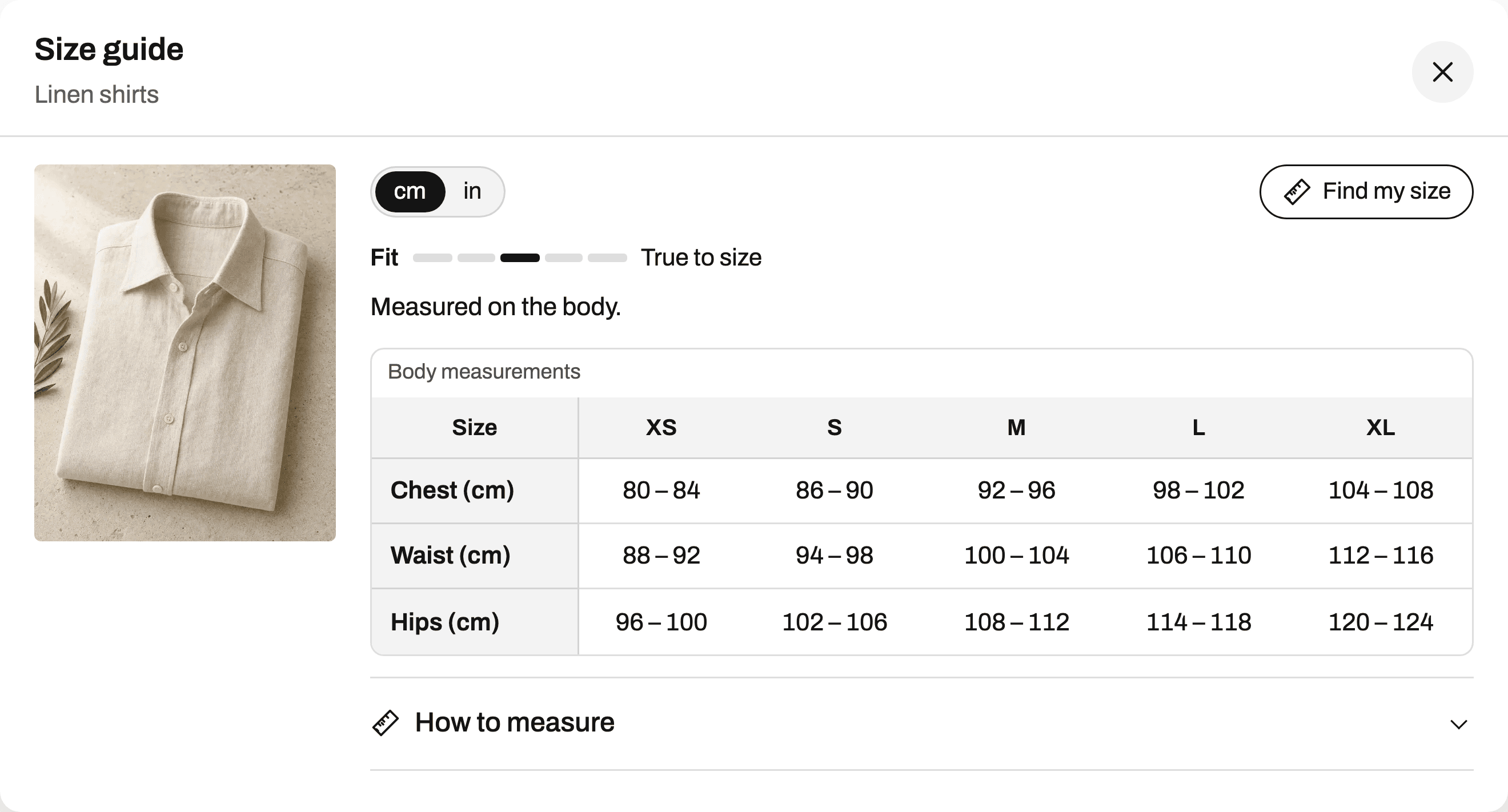
In Ruban Size, the app embed places a "Size guide" link next to the size option by itself on 25 of the 26 themes most used by stores with size charts, and the chart is HTML text drawn by your theme. If your theme is the odd one out, the app block drags into place in the theme editor, or we place it for you, free. More on how size charts show on each product.
2. Show the units your shoppers think in
A shopper in Ohio knows her waist in inches. A shopper in Lyon knows his in centimeters. Ask either one to convert in their head (2.54 cm to the inch) and you have invited a rounding error, or a wrong size.
Ruban Size gives every chart a cm and in switch. Shoppers in the US, Liberia and Myanmar see inches first, everyone else centimeters, and the choice is remembered from one product to the next. Inches can show as fractions (½, ¼, ¾) or decimals. If your sizes are labeled differently by market, US, UK and EU rows sit on the chart with a switch, US by default for the US, UK for Great Britain and Ireland.
3. Say how to measure, next to the numbers
A correct chart still produces a wrong size when the shopper measured somewhere else. A waist taken at the hip bone, a chest taken over a sweater, a foot measured sitting down: the numbers are off before they reach your table.
Write one short line per measurement, right beside the chart. These are the lines Ruban Size ships with its templates:
- Chest: around the fullest part of your chest, under the arms, tape level.
- Waist: around your natural waistline, the narrowest part of your torso.
- Hips: feet together, around the fullest part of your hips.
- Foot length: heel against a wall, from the wall to the tip of your longest toe.
The "How to measure" block puts those steps beside a body or foot figure, and the measurement a shopper reads lights up in the figure and in the table. Charts imported from another app often have no measuring guide at all, so Ruban Size adds a short, collapsed one built from the measurements the chart contains.
4. Say whether the numbers are body or garment
"Chest 53" on a T-shirt chart can be half the chest of the shirt, laid flat. A shopper with a 104 cm chest reads 53, compares it with nothing, and guesses. Label it the way the men's T-shirt template does: "Half chest, laid flat (cm)". The difference is explained in body vs garment measurements.
Find my size spots garment measurements on its own, from headers like "flat" or "garment" and from values too small to be a body, doubles the flat ones and adds the room a garment of that type needs before comparing.
5. Add a fit note when the cut isn't standard
If a pair of pants is cut slim, say so, and say what to do about it. "Slim cut: if you are between sizes, take the next size up" is a note a shopper can act on. "Runs small" alone is not.
Ruban Size puts a five-step fit scale above the chart (runs small, runs slightly small, true to size, runs slightly large, runs large) with your note under it, and Find my size moves its answer with the scale. How to write those notes is in fit notes that help.
6. Give a size from the shopper's own measurements
A table asks the shopper to do the matching: chest in one column, waist in another, and what to do when they disagree. A size finder does that work and shows it.
Find my size asks for the measurements your chart has and answers with one size ("Your size: M"), how sure it is (high, medium or low) and one line per measurement ("Chest 94 cm: M, middle of the range"). When a shopper sits between two sizes it says which one to take. It never suggests a size beyond your largest one. It is on every plan, the free one too, and the measurements stay on the shopper's device, so their size shows on every product without an account. See how Find my size works.
7. Cover every product that has a size option
A product with sizes and no chart is a guess by design. These gaps creep in as you add products: a new collection, a vendor you didn't tag, an old product that never had a chart.
Ruban Size shows charts by tags, vendors, types, collections, chosen products or conditions on the title, and lists the products a chart will show on before you save. The coverage report then lists the products with a size option and no chart, the charts shown nowhere, the products with several charts, and an old size chart app still installed. The rules are on product rules.
8. Read which sizes come back, then fix the chart
Your return reasons say which way a size missed. A jacket that keeps coming back "too small" in L is telling you something specific about L.
On the Fit plan, Ruban Size's returns by size reads the return reasons of the last 60 days in your browser and flags a size from 3 size returns when at least 70% point the same way. One click sets the chart's fit scale, and Find my size takes it into account. The same page compares the size return rate of orders where a guide was opened with the others. The details are in reading your returns by size.
If you only have an afternoon
Do steps 1, 3 and 6: a real table at the size option, a line on how to measure each number, and Find my size switched on. They cost nothing on Ruban Size's free plan, which covers 5 active charts, and they answer the three questions every shopper has at the size selector: where is the chart, where do I measure, which size am I. Then come back to the rest.
Questions
Why do shoppers return clothes for the wrong size?
Because they guessed. The chart was hard to find or read, in units they don't use, measured differently from how they measured themselves, or the cut ran small and nothing said so.
Does adding a size chart reduce returns?
It helps when shoppers can find it at the size selector, read it on a phone and match it to their own numbers. Ruban Size's Fit plan shows the size return rate of orders with and without a guide open, so you can see the effect in your own store.
How do I see which sizes get returned on Shopify?
Shopify stores a reason on each returned item. Ruban Size's returns by size groups those reasons by product and size, too small against too big, over the last 60 days.
Is a size finder worth it for a small store?
A size finder that works from measurements needs no order history, so it helps from the first day. Find my size is included on Ruban Size's free plan.
Keep reading
- ReturnsWhy shoppers order two sizes, and how to stop itShoppers order two sizes when they can't trust any single one. Give them one size with its reasons, keep it for them on every product, and show a neighbor size only when it is a real alternative.5 min
- ReturnsReading your returns by sizeCount each size's returns as too small against too big. When one size keeps coming back the same way, the chart or the cut is off for that size, so fix the numbers or the fit scale. Ruban Size does the counting from Shopify's return reasons.6 min
- ReturnsFit notes that help: "runs small" and the fit scaleA fit note helps when it names the cut and says what to do: "Slim cut: if you are between sizes, take the next size up." Put it under a fixed five-step fit scale, and let the size finder move its answer with the scale.6 min
- ReturnsWriting a size exchange policy shoppers trustA size exchange policy shoppers trust answers five questions with numbers: how long they have, what state the item must be in, who pays the shipping, what happens if the new size is sold out, and how to start. Put one line of it in the size guide and the same numbers on your policy page.6 min