
Why shoppers order two sizes, and how to stop it
Shoppers order two sizes when they can't trust any single one. Give them one size with its reasons, keep it for them on every product, and show a neighbor size only when it is a real alternative.
Ordering the same item in two sizes, keeping one and sending the other back, has a name: bracketing. From the shopper's side it is a sensible move. If they can't tell M from L and returns are easy, buying both is cheaper than buying the wrong one.
The store pays for it twice: two shipments out, one back, and a size that sat in someone's hallway instead of on sale. You can't forbid it without annoying the people who buy two sizes for two people. What you can do is take away the doubt that causes it.
Why a shopper hedges
Bracketing is a symptom. These are the doubts behind it, and each one has a fix on the product page.
- They're between two sizes on your chart. Their chest says M, their waist says L, or one measurement sits right on the line between two ranges.
- They don't know your brand's fit. A medium elsewhere is not a medium here, and they know it. We cover why in why a medium isn't the same size at every brand.
- The chart doesn't answer the question. It is an image, in the wrong unit, gives garment measurements without saying so, or doesn't say where to measure.
- They start from zero on every product. Nothing remembers what fit them last time.
- The page gives advice they can't apply. "If you're between sizes, size up" only helps a shopper who knows they are between sizes.
A size they can trust
Trust comes from an answer that shows its work. "Your size: M" alone is a claim. "Chest 94 cm: M, middle of the range" is a reason, and a shopper can check it against the table in a second.
That is what Ruban Size's Find my size does, on every plan. The shopper types the measurements your chart has (chest and waist for a T-shirt, waist and hips for pants, foot length for shoes) and gets one size, how sure the answer is, and one line per measurement saying where it falls: bottom, middle or top of the range, or between two sizes.
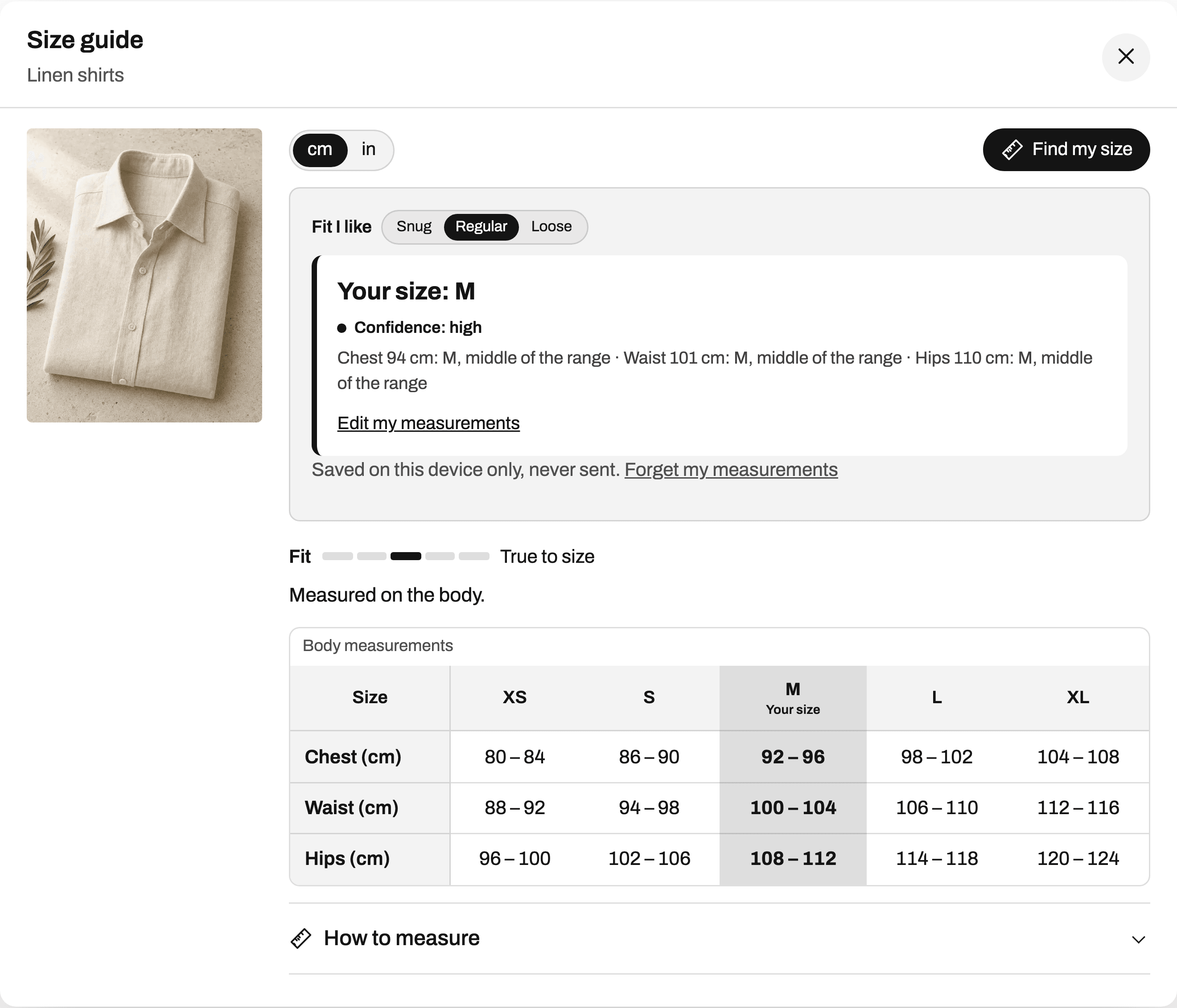
The confidence is said in words: "Confidence: high", "Confidence: medium", or "Confidence: low. Check the chart, or contact us." A low answer that says so keeps the shopper with you. A confident answer that turns out wrong teaches them to bracket next time.
When they really are between two sizes, pick one
Some shoppers are genuinely between sizes. Showing them both sizes and leaving the choice to them is how you get both sizes in the cart.
Find my size names the two sizes and picks one, in the order of your sizes: "You are between 32 and 34. We suggest 32." It then lets the shopper steer with one control, "Fit I like: Snug, Regular, Loose", and the answer changes at once. A shopper who likes room and sees the larger size has made a decision, which is the opposite of a hedge.
Behind that sentence are a few rules. At equal fit the larger size wins, the smaller one for a snug preference. For hats, helmets and belts, between two printed ranges, it takes the larger. And when your chart's fit scale says the cut runs small, the target moves up before any of this is decided.
Show the neighbor size only when it's real
A recommender that always says "M, or maybe S or L" is training shoppers to order two.
Find my size mentions a second size only when it is a real alternative: when the shopper is between two sizes, or close to the edge of the one suggested. Then it says which way and why: "L may also fit if you like more room", or "S may also fit if you like a closer fit". A shopper in the middle of M gets M, and nothing else to worry about.
The same rule holds at the ends of your chart. Find my size never suggests a size beyond your largest one. If the measurements are above it, it says so ("Your measurements are above our largest size (XXL). Check the unit (cm or in), or contact us.") and offers no button to select a size that won't fit.
Remember their size on every product
The second order is easier to get right than the first, if the store remembers. Find my size saves the shopper's measurements on their device only, never sent anywhere, and shows "Your size: M" on every product whose chart it can read. No account, no form to fill again. Children's measurements are kept apart from the parent's, so ordering for a child doesn't overwrite the adult's size.
"Select this size" picks the matching option in your theme's size selector. If that size is sold out, Find my size says so ("Your size: M. Sold out right now.") and offers the nearest size in stock only when it is within one step on each measurement.
Make each product's fit clear
The brand-fit doubt (reason 2 above) is answered product by product. A fit scale above the chart (runs small, true to size, runs large, and the two steps between) and a one-line note ("Slim cut: if you are between sizes, take the next size up") tell the shopper how this item compares with your own numbers. What "true to size" means covers the words.
In Ruban Size the scale and the note sit in the chart's Fit and Find my size tab, and the recommendation moves with them. The same tab sets the garment type, body or garment measurements, and stretch fabric. More on the fit settings per product type.
Check that it's working
You won't see bracketing as a line in a report, but you will see its traces: sizes that keep coming back "too small" or "too big". On the Fit plan, returns by size flags those sizes from your Shopify return reasons and compares the size return rate of orders where a guide was opened with the orders where it wasn't.
If a product keeps returning in M as too small, shoppers will start ordering M and L. Fix the chart or the fit scale, and the reason to hedge goes away. The full list of fixes is in how to reduce size returns.
Questions
What is bracketing in online shopping?
Bracketing is ordering the same item in two or more sizes, keeping the one that fits and returning the rest. Shoppers do it when they aren't sure which size to pick.
Should I limit how many sizes a shopper can order?
Limits hit honest orders too, like two sizes for two people. Removing the doubt works better: a clear chart, a size from their own measurements, and a second size shown only when it is a real alternative.
Does "if you're between sizes, size up" help?
Only if shoppers know they are between sizes and the cut really runs small. Find my size tells them when they are between two sizes and which one to take for this chart.
Do shoppers need an account to see their saved size?
No. Find my size keeps their measurements on their own device and shows "Your size" on every product with a chart it can read. The measurements are never sent to Ruban Size.
Keep reading
- ReturnsHow to reduce size returns in a Shopify storeA size return is a shopper who guessed. Put a readable chart next to the size option, in their units, with how to measure and a fit note, give them a size from their own measurements, then read which sizes still come back.6 min
- Find my sizeHow Find my size works, step by stepFind my size reads your chart as ranges with no gaps, works out a target for each measurement, scores every size, and shows the best one with how sure it is and why. It runs on the shopper's device and never suggests a size beyond your largest.7 min
- Sizing explainedWhat "true to size" means, and how to show itTrue to size means an item fits the way its size chart says, so shoppers take the size the chart gives them. A store shows it best on a fixed scale from runs small to runs large, with one line of fit note.6 min
- ReturnsReading your returns by sizeCount each size's returns as too small against too big. When one size keeps coming back the same way, the chart or the cut is off for that size, so fix the numbers or the fit scale. Ruban Size does the counting from Shopify's return reasons.6 min