
Reading your returns by size
Count each size's returns as too small against too big. When one size keeps coming back the same way, the chart or the cut is off for that size, so fix the numbers or the fit scale. Ruban Size does the counting from Shopify's return reasons.
A product's return rate tells you little on its own. The useful part is the split: which size came back, and which way it missed. Ten returns of a jacket tell you to look; eight of them in L marked "too small" tell you where.
This is how to read those returns, what counts as a pattern and what is noise, and what to change once a size stands out.
What to count
Count only the returns that are about size, and keep the direction.
- Too small: "too small" and its finer versions in Shopify's return reasons, like a waist too small, a band too tight, sleeves too short.
- Too big: "too big", "too large", "too loose", too long, too wide.
- No direction: a return marked just "size" or "fit" says something went wrong but not which way. It can't tell you to move up or down, so keep it apart.
Count per product and per size, and keep the items sold in that size next to it. Three returns of M mean one thing out of five sold and another out of three hundred.
When a size really runs small
Two "too small" returns in a week can be two shoppers who measured over a jumper. You need a rule that waits for enough returns and asks for a clear direction.
The rule Ruban Size uses: a size is flagged from 3 size returns when at least 70% point the same way. For a verdict on a whole chart, across every product it shows on, it waits for 5 size returns with the same 70%. Here is the rule at work on one product:
| Size | Too small | Too big | Size returns | Verdict |
|---|---|---|---|---|
| S | 1 | 1 | 2 | Not enough yet |
| M | 4 | 1 | 5 | Runs small (4 of 5) |
| L | 2 | 2 | 4 | Mixed |
| XL | 0 | 3 | 3 | Runs large (3 of 3) |
S has too few returns to say anything. L comes back both ways, which says less about the cut than about how shoppers pick it: a range that is too wide, or a measuring step people read differently. M and XL each lean one way clearly enough to act on.
When the returns of a chart split both ways, the chart's verdict reads "Mixed: check the sizes below", and the sizes that do stand out are listed under it.
Where the numbers come from
Shopify keeps a return reason on each returned item, chosen when the return is created. On the Fit plan, Ruban Size's returns by size (Insights, then Returns by size) reads the orders of the last 60 days, or 30, and their returns, then groups them by product, size and chart, using the same rules that decide which chart shows on which product.
It all happens in your browser while the page is open. Nothing is stored, nothing is sent to Ruban Size's server, and no customer name, email or address is read: only items, sizes and reasons. Shopify still asks the app for access to protected customer data (level 1) before it hands over orders, and the page says so if that access is missing.
The page opens with your data: orders, items sold, items returned, returns with a reason, and returns about the size. If fewer than half of your returns have a reason, it warns you, because the verdicts below would rest on too little. Three ways to get more reasons:
- Ask for a reason every time you create a return in Shopify.
- Give your products a product category. Shopify only offers size reasons for categorized products.
- If you use a returns app, map its reasons to Shopify's.
What to do with a flagged size
A flag is a question, not an answer. Work through it in this order.
- One size of one product is off. Check that size's numbers in the chart first: a range copied from the next size, a typo, a centimeter value in an inch row. Then check the product itself: a new batch can be cut differently.
- A whole chart leans one way. Set the chart's fit scale. Next to the chart's verdict, one click on "Set fit to 'Runs slightly small'" (or slightly large) writes the step on the chart, with a note: "Customers often find this runs small: if you are between two sizes, take the larger one." A fit note you wrote yourself is kept.
- Let Find my size follow. The scale moves Find my size's target up by a fifth of a size step at "slightly", and by just over half a step at the full "runs small". Shoppers near the top of a size are sent to the next one; shoppers in the middle of a size keep it, and only hear about the next size at the strongest step.
- Read again later. New orders replace old ones in the 60-day window. If the flag clears, the fix worked.
For the words shoppers see on the scale and how to write the note, see fit notes that help.
With and without a guide open
The other number worth watching is on the Statistics tab, also on Fit: the size return rate of orders where a size guide was opened, next to the rate of orders where it wasn't. "Size returns" here means items returned as too small or too large, out of the items ordered. The tab opens on the funnel, from product views to add to cart; the orders and size returns after an open come under it.
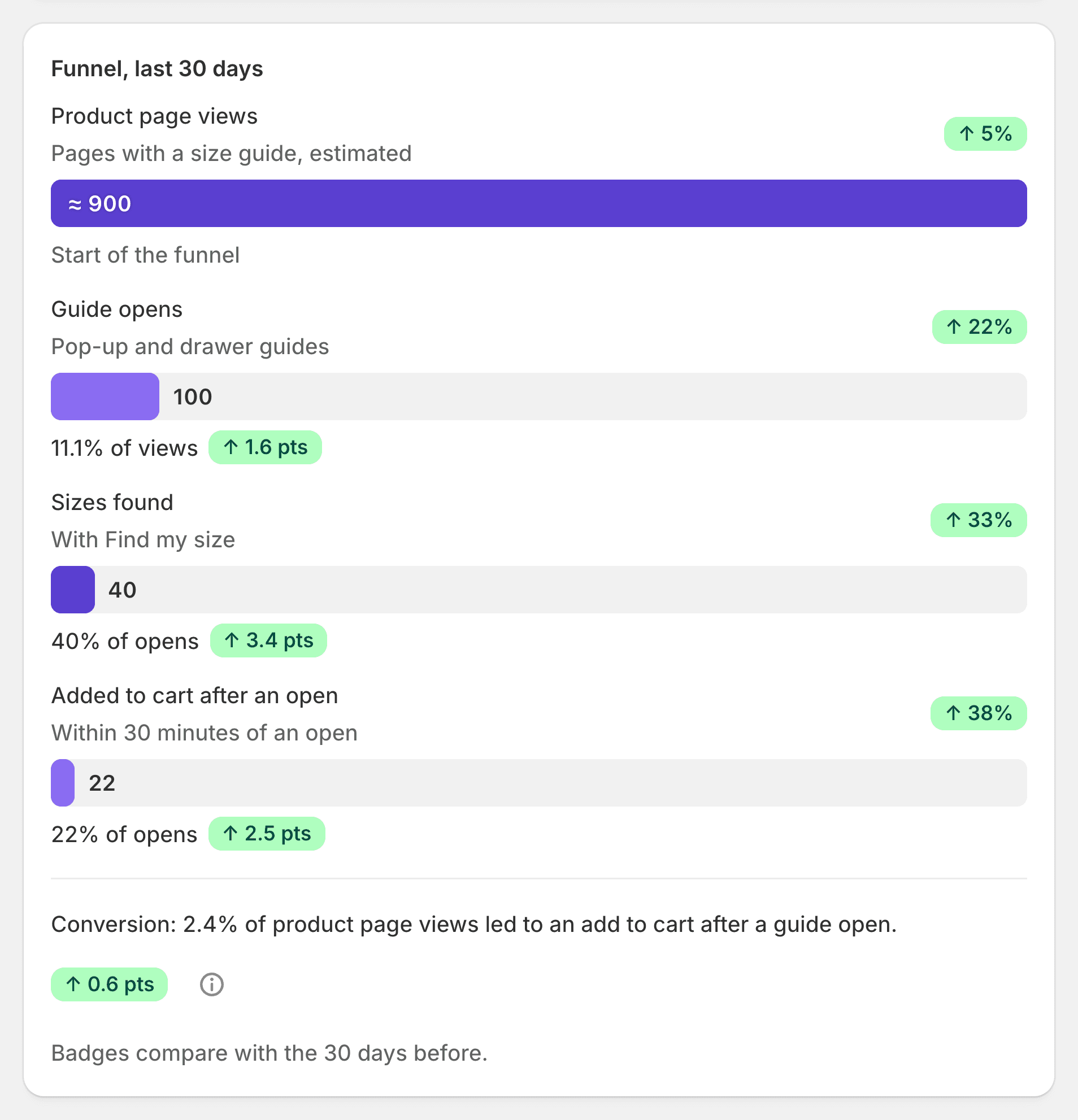
When a shopper opens a guide, Ruban Size adds a hidden attribute to their cart with the chart's handle and nothing about the shopper. Your orders carry it, and the admin reads it in your browser, like the returns. The comparison starts from the first order that carries the mark, so orders placed before you installed the app don't skew it. A line below it does the same for orders where Find my size gave a size.
Read the gap with care. Shoppers who open a guide are not the same as those who don't: some are unsure, some know your brand by heart. A lower rate with a guide is a good sign; it is not a controlled test. Recent orders may still be returned, so the newest weeks always look a little better than they will.
Why this beats a total return rate
A total rate mixes every reason (damaged, late, changed my mind) with every size. It moves when your mix of products moves. The split by size and direction points at one row of one chart, and the fix is a number you can change today. The rest of the list of fixes, from placement to units to Find my size, is in how to reduce size returns. The plans are on the pricing page, and the statistics on analytics and returns.
Questions
Where does Shopify store return reasons?
On each returned item. The reason is chosen when the return is created, by you in the admin or by the customer when they ask for a return, from Shopify's list of return reasons.
How many returns before a size counts as running small?
Ruban Size flags a size from 3 size returns when at least 70% point the same way. A whole chart needs 5 size returns with the same 70% before it suggests a new fit scale.
Can I see returns older than 60 days?
Not yet. Shopify gives apps the last 60 days of orders; older orders need a separate access that Ruban Size doesn't ask for yet.
Which plan has returns by size?
Fit, at $9.99 a month or $99 a year, with a 14-day free trial. Returns by size, the detailed statistics and the height and weight estimate are what Fit adds to Pro.
Keep reading
- ReturnsHow to reduce size returns in a Shopify storeA size return is a shopper who guessed. Put a readable chart next to the size option, in their units, with how to measure and a fit note, give them a size from their own measurements, then read which sizes still come back.6 min
- ReturnsFit notes that help: "runs small" and the fit scaleA fit note helps when it names the cut and says what to do: "Slim cut: if you are between sizes, take the next size up." Put it under a fixed five-step fit scale, and let the size finder move its answer with the scale.6 min
- Sizing explainedWhat "true to size" means, and how to show itTrue to size means an item fits the way its size chart says, so shoppers take the size the chart gives them. A store shows it best on a fixed scale from runs small to runs large, with one line of fit note.6 min
- ReturnsWhy shoppers order two sizes, and how to stop itShoppers order two sizes when they can't trust any single one. Give them one size with its reasons, keep it for them on every product, and show a neighbor size only when it is a real alternative.5 min